Your smart meters already know about the leak. Now your office will too.
Connect your AMI system and readings flow straight into billing. Leaks, tampering and stopped meters show up as alerts your staff can act on, and a reading that looks wrong never reaches a bill until someone has checked it.
- Built for Badger Meter BEACON (where it stands)
- Add-on from $99 a month
Screens on this page show simulated meter data.
Readings arrive on their own, and you check them before they're billed.
When it's time to bill, WaterWorksPro collects every meter's reading from your AMI system. Normal reads are ready to go. Anything unusual is flagged for a person to look at.
- No routes to walk for your smart meters
- Unusual reads are flagged, with a plain-English note on why
- Bills can't be generated while a flagged read is still open
Leaks become a to-do list, not a surprise on next month's bill.
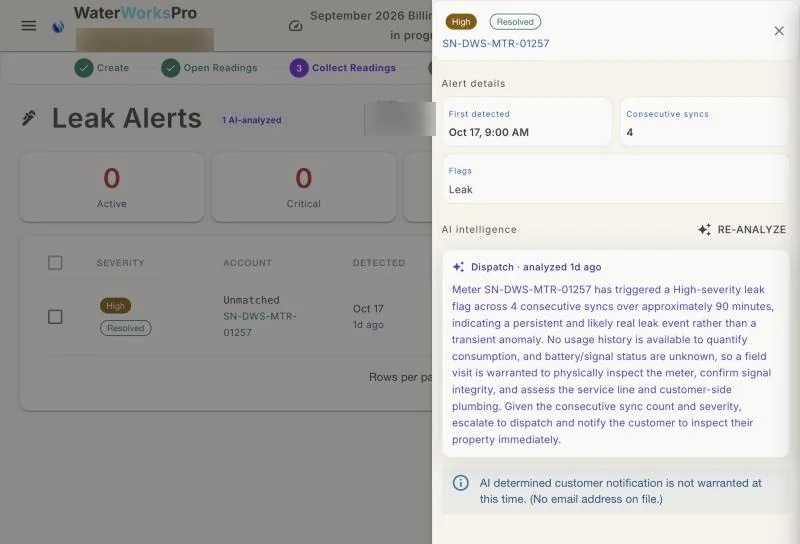
When a meter reports a leak, tampering or no flow, it lands in Leak Alerts with what the meter saw and a short AI summary of what to do next. Staff can acknowledge it, send someone out, resolve it or mark it a false alarm, and each step is recorded.
- Set to check about every two hours, and on demand with "Sync now"
- Send someone out to investigate straight from the alert
- Leak adjustments go on the account with a reason
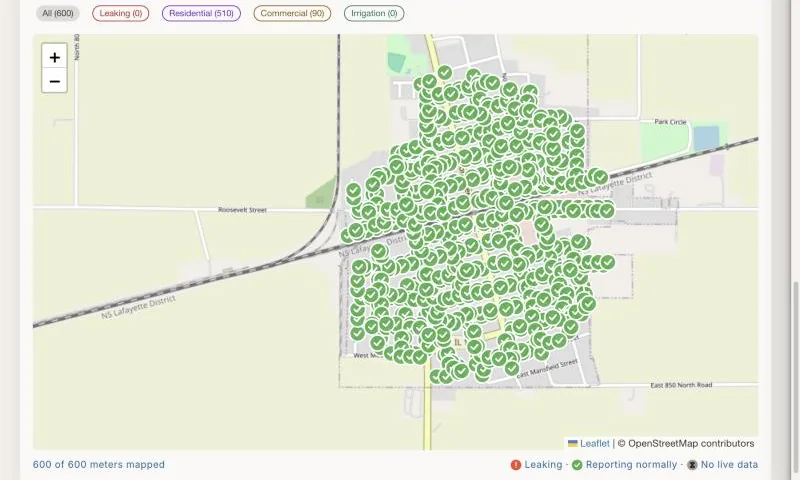
See which meters reported and which went quiet.
AMI Status shows the health of every meter as a table or on a map of your town, like the one at the top of this page. A meter that stops reporting stands out before it costs you a billing cycle.
- Table or map, whichever you prefer
- New meters are matched to accounts by serial number
- Anything that can't be matched waits for you to decide
Customers get the heads-up too.
In the customer portal, anyone whose usage jumps to more than twice their recent average sees a "possible leak" notice next to their bill, with a nudge to check their pipes before the next one.
Added to your monthly plan.
Requires AMI-capable meters your utility already owns. See full pricing →
Smart meter questions, answered.
Which smart meter systems does WaterWorksPro connect to?
The connection is built for Badger Meter's BEACON, following Badger's published API, and tested against simulated meter data. It hasn't been connected to a live utility's BEACON account yet. If you're on BEACON, your utility would be the first, and we'd set it up and test it together before it touches a single bill. Other AMI systems can be added; tell us which one you use.
Will a bad reading end up on someone's bill?
Not without a person seeing it. Unusual reads are flagged, and bills for the cycle can't be generated until every flag has been accepted, corrected or rejected.
How quickly will we hear about a leak?
WaterWorksPro is set to check your meters about every two hours, and you can check right away with "Sync now." New leak alerts show up in Leak Alerts and on your Activity Center.
Do we still need meter readers?
Not for meters that report through AMI. If you read meters by hand, the field reading app handles that instead.
Can I try this in the live demo?
Partly. The five-minute billing tour uses smart-meter readings, so you can watch them flow into a bill run. Leak alerts and the meter map aren't in the demo yet, so request a walkthrough to see those on a sample utility.
What does it cost?
$99, $149 or $249 a month on top of your plan, depending on your number of accounts. Setup is part of your onboarding.
Have smart meters? Let's look at yours.
Tell us your meter brand and roughly how many accounts you have. We'll show you what it would look like for your town.