Answer "why is my bill so high?" before the caller finishes asking.
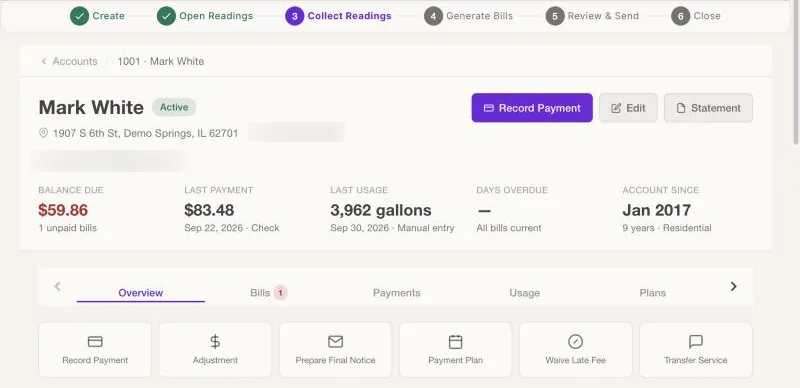
Every account has one screen with the balance, last payment, usage, bills and meter. The everyday office jobs, like taking a payment, setting up a plan or scheduling a shut-off, start from that same screen.
Cash and checks at the counter, or a stack of checks at once.
Record a single payment from the account, or enter a whole batch of mailed checks in one go. Double clicks and retries never record a payment twice, and a repeated check number gets a warning before it's saved.
- Payments apply to the oldest unpaid bills first
- Mistakes can be voided, and every void is on record
- Customers can also pay online when you turn it on
Payment plans and shut-offs, handled fairly and on the record.
A delinquency list shows who's behind and by how much. Agree a payment plan with a customer and WaterWorksPro schedules the installments, tracks them each night, and prints the agreement. Shut-offs are only allowed for money that's actually past due.
- An active payment plan blocks a shut-off automatically
- Protect an account from shut-off for a medical certificate or hardship agreement
- Paying the past-due amount cancels a scheduled shut-off on its own
Move-ins, move-outs and corrections without a workaround.
- Transfer service to a new customer at the same address, with the meter and history
- Adjustments with a reason: leak adjustment, billing error, courtesy credit and more
- Deposits recorded and tracked on the account
- Post boil-water notices and other service advisories to the customer portal
Office questions, answered.
Can more than one person work in it at once?
Yes. It's a web app, so your clerk, your manager and your meter reader can all be signed in at the same time, each seeing what their role needs.
What if someone records a payment by mistake?
Staff can void their own cash or check entry within a day, and administrators can void any time. Voids are kept in the audit log, so the history stays complete.
Can customers get a statement?
Yes. Print or download a statement from the account screen, and customers can see their bills in the customer portal.
See the account screen with your own questions.
Bring your trickiest customer call to a walkthrough, and we'll show you how it's answered.